Showing posts with label computer stuff. Show all posts

Thursday, 29 October 2015

Breaking things, repairing things, twisting templates. And linen dyeing.

I spent the morning going more into the up-and-coming relaunch, and I did manage to do a test migration into WordPress, so there will be some changes to this blog's looks before the year will end.

The new shop design is also coming along nicely. It will be much lighter, and much cleaner, and there will be larger pictures. Overall, I really like it a lot! There's still a few issues to be solved and snags to be taken care of, and changing the old pallia.net site over into Joomla will mean a bit of re-writing of text and menu restructures (read: a good bit of work, including thinking and figuring out the best way for stuff), but I have hopes it will all work out eventually.

Apart from that, I managed to break my xampp programme (the thing required to test-drive a web page on your own computer, under the charming name of "localhost") and to actually fix it again (by deleting a single line of code that had crept in through an aborted installation of WordPress). Whew!

Now, however, I will have to put this project aside for a bit, as the Textile Forum is coming up (I can't believe it is already almost November) and there's still a few things to prepare for it. Packing linen cloth for our next test run regarding linen dyeing, for instance!

Sabine and I have been thinking about the chemistry involved with dyeing linen for a few years now, and we did a first trial run on exploring linen dyeing at last year's forum. One of the possible influences on how well the linen takes the mordant (which is usually not very well at all) is the pH of the mordanting and dyeing liquid, so we set out to test this.

Last year's test results. As you can clearly see, there was not much dye taken up by the linen fabric, regardless of the pH adjustment of the mordanting and dyeing baths.
We'll try different concentrations of alum this time. We've also planned to test a pre-treatment with sulphur fumes, though the required sulphur strips have not arrived yet - I'll keep my fingers crossed that they will come today.

The reason for sulphur pre-treatment? It seems that the metal components of the mordant bind to wool through a connection to the sulphur bonds the wool has. So if it's possible to sulphurise the linen, it might be possible to have a much better mordant uptake, and thus dye uptake. Next week we'll know more!

Wednesday, 28 October 2015

The Gold Embroidery Kit is in the shop!

Today was a good bit more successful than yesterday. It looks like I finally found the issue with the Joomla! migration to 3.x (there's an extra folder in the libraries that messes up everything, and once that is deleted, all runs smoothly); a quick facebook query resulted in multiple comments that you don't mind having to activate JavaScript to see anything too much; and the template I found does look like it could be a nice solution for my site, both for the main site and the webshop.

And, hopefully, the blog. I'm looking into pulling all things together so blogposts will also be hosted on my own server, taking it out of Google's hands (as blogger is part of Google). My current plan is to leave everything here on the blog, but additionally migrate all the content to my own site, and then blog on there (with a link to the new place here, obviously). My hope is that the migration will solve the wonky search issues that Blogger has (if you have ever tried to find a post on this blog using the search box, you'll know what I mean - search is not really reliable). Plus it would have the benefit of my having to spend time on one site only, and to give my three places a similar design, finally.

I will only do it if I can do a clean migration, though, and I'm currently looking into options for that. The easiest and most straight-forward one that I found will not migrate comments or tags, though, so it's completely out (that was CMS2CMS, in case you want to know).

And now for something more textile-related - I have finally put the gold embroidery kit into the shop!
The core of the kit - motif drawn on cloth and mounted in frame, plant-dyed silk, gold thread and embroidery needles so you can get started right away!
 It is available here. The kit contains everything to get started right away, down to the embroidery needles (you'll need your own pair of scissors or shears, but that's it), and ample instructions - a sheet with specific instructions for the motif plus my book about gold embroidery.

I made a few photos of nice, colourful yarns as well, but I haven't yet figured out how to put the scarf kit into the shop. See, there was this co-production with Margit from Alte Künste, where we developed a lengthwise-striped scarf together, to be sold in a kit. Margit picked yarns, and I took care of the pattern - easy enough to remember it, interesting enough to keep you from dozing off while knitting.


The first batch of scarf kits is sitting here, ready to go get knitted, and we have twelve different colours for the skeins:


For each kit, you get to pick three skeins in colours of your choice (that's 150 g of wool alltogether). I'm trying to figure out how to make this selection process as smoothly working as possible, but the system is resisting a bit, so it might come down to you having to list your yarn choices in the comment when ordering. I'll give it another try tonight!

Friday, 4 September 2015

Windows Privacy Issues.

I was planning to post about something else today (new shoes! more Hugo thoughts! progress in the embroidery!), but my morning reading of semi-random internet stuff has left me frantically de-installing some Windows updates.

If you're using Windows and value your privacy, this concerns you. As you might have noticed, Win10 is being rolled out and offered for free for a while (where "while" might mean at least several months). I have completely ignored that up to now, as I'm happy with my Win7 and not planning to move from it unless absolutely necessary... so I've also missed the privacy concerns with Win10. Apparently, once you install the new OS, you allow Microsoft to look at or download (upload-to-cloud) almost all your data, and even pass it on. All. Your. Data. (More about Win10 privacy. And even more.) 

The agreements to this very broad, very inclusive data-sharing is included in the End User Licence Agreement. The EULA. You know, that long, long text of semi-legalese gibberish that almost nobody anywhere reads... so once you install Win10, you agree that MS may have All Your Data.

But. But! Similar tools to pull your data have also been rolled out, quietly, as updates to Win7 and Win8. If you have automatic updates enabled, or have manually installed them, your computer is allowed to share your data on Microsoft's terms.

There was no warning or easily accessible information about what the updates would do... so I did install them. I do value my privacy, and data security, so I would never have agreed to this had I been aware, and frankly, I'm really pissed at MS about this.

Really, Microsoft? Really? I am looking sternly at you. That is not good behaviour. Even a kitty can tell.

Fortunately, lovely tech-savvy people on the Internet have posted instructions on how to uninstall the updates that are passing on your data from Win7 and Win8. Which is what I am doing right now. Care to join me?

Oh, and please pass this information around to your friends, colleagues, enemies, whomever - data security and a right to privacy is for everyone. And Microsoft should not get away with this!

Thursday, 9 July 2015

Update your Adobe Flash Player!


There's been a leak about a possible exploit for the Adobe Flash Player, so if you are having that thing installed on your machine (chances are high you have), you should update it as of right now.


You can do that by installing it from the Adobe website (don't forget to uncheck the boxes that say you totally want their crapware), or use this link to download the full installer you need and get it without the crapware stuff.

I do not want your antivirus thingie, Adobe. Go away.


Go download and install. Do it now. Seriously. Adobe classifies this as a real risk, and the how-to instructions on using the loophole in their code has been leaked to hacker sites. According to Adobe,

Successful exploitation could cause a crash and potentially allow an attacker to take control of the affected system.   Adobe is aware of reports that an exploit targeting this vulnerability has been published publicly. Adobe expects to make updates available on July 8, 2015.

Theoretically, you could deinstall the thing completely and be utterly safe... but so much on the 'net these days uses flash that it could really prove a nuisance. If you are running Firefox, however, you could consider using noscript to block unnecessary stuff including flashy stuff when you don't want to see or use it.

And that's your internet security note for today. : )  Surf safely.

Monday, 6 July 2015

It's too damn hot.

We're still in full-on heatwave mode here, and though there are a few clouds in the sky, it remains brightly (and hotly) sunny. Well, at least this year nobody can complain about a nasty, cold grey summer!

In spite of the weekend's heat, we managed to have fun at a wedding party, relax, and get a new (and larger) rainwater tank installed at the back of the house. Now if it should rain, we'll get all the water that lands on half of the roof of the house (it's a saddle roof, so naturally you only get half the roof with one tank). I'm very excited to see how much water will come through into the tank from one "normal" rain. (I could do some maths and estimate how many square metres the roof has, and calculate from there, but... it's too damn hot for maths.)

I also spent some time during the weekend on website updating work*. You don't see anything of that yet, though - I have managed to clone the online shop to my local system, where it's now happily running on an installation of XAMPP. Installing that was the easiest part, though! It took a few tries and thus quite a bit of time to get everything running...

The first issues were with getting the backup extension for Joomla! to run. Akeeba backup and my hoster have sort of a strained relationship, it seems. After a while, that did work; so then I got to figure out how to get the copy to run locally. And then... several tries of updating from Joomla 2.5.x to 3.x. There's a number of steps that has to be taken in the correct sequence, and in the end I had to manually unpack the update package into the root directory and run the database fix. Main problem seems to have been template issues... but now it seems like it's running.

So I'm currently updating the shop system on the local copy, and then I will have to find a nice template for the new site. It will probably take a few months before I'm ready for the relaunch, but at least the most important step is done now - getting the upgrade to Joomla 3.x to work.


* I'm a firm believer in "never change a running system" and "if it ain't broken, don't fix it". Case in point? My graphics programme is 19 years old. But that's an old programme that works, and there are no internet security issues connected to it. In case of my website, support for Joomla 2.5 is running out, and that will in time leave the website open to attacks. And make it become more and more outdated, so... nothing left but to embrace the change. At least it's a nice reason to finally tackle the website and get it up to date again!

Tuesday, 13 January 2015

The fan is clean again!

Last week, I finally cleaned the fan in my laptop. The reason I finally did it was that during our hanging-out-with-friends over the New Year, I had brought my little computer, and it had stood out. Not due to being the only one, or the smallest, or the oldest - but it was, by far, the loudest.

So that morning back home, I heaved a big sigh, carried it over to the dinner table, took out the screwdrivers and braced for something nasty... all because of this song:


I love that song. It's hilarious. But it also made me expect a nightmare. I'm very happy to report now that my expectations were grossly mistaken, and it took me only eight screws, two q-tips, a small vacuum cleaner and about fifteen minutes (including getting the vacuum and putting it away again) to get the fan and, more importantly, the totally fluff-blocked fan grille squeaky clean again. It was just a single panel (five screws) and then the fan itself (three screws). Thanks Asus!

Monday, 12 January 2015

Newsy stuff.

While I've been absent from blogging, interesting stuff has accumulated - plus new things came in, like this note today:

The Guardian: German anthropologist exposed as fraud.

The Rijksmuseum in the Netherlands has made its collection of public domain images freely available on the net, and is very content with the outcome. There's a paper about it here.

And the Germanisches Nationalmuseum in Nuremburg is planning an exhibition on early modern dress - due to start sometime this year, as far as I understand the plan.

Something technical to round it up - should you be worried that some spammer might have access to your email and personal data, you can use this handy Identity Leak Checker to find out.

Tuesday, 9 December 2014

Housekeeping.

It's time for some housekeeping again - well, housekeeping in regard to the computer. We have a lovely thing for keeping files safe and sound, since I have become an even bigger fan of secure backups when several hard disks died during my phd thesis writing. (I lost a bit of work each time, but not much, thanks to regular backing up.) So these days, we have a RAID 1, which is really cool, and with 2 TB, it's also quite roomy. For the non-computer geeks: RAID stands for Redundant Array of Individual (or Inexpensive) Disks. The 1 after that means you get two identical hard disk drives, and then you write all your data on both disks, so they should have identical content. The smart thing can check itself to make sure both disks are working and both have the same content - and in case one dies, you replace it and the thing mirrors the contents of the survivor to the empty replacement. It's not the securest thing there ever was, since there's no guarantee both won't die at once, but much better than just a single disk. (There's lots of more numbers for RAIDs that mean delightfully complicated arrangements of several disks to speed things up and make stuff extra-secure. But we stick with the 1, for now.)

Doing lots of backups, though, and with an inclination to rather copy a file once more than one time too few, duplicate files will inevitably accumulate. Which means that even roomy RAIDs will, at a certain point in time, not be so roomy anymore. So now and then, housekeeping is on the agenda. Which means that my computer has been running a duplicate search over night, and I just spent a little while checking what it has found, and generously deleting duplicates, triplicates and in some cases even quadriplicates. (That happens when you backup everything, then move a file to a different location, accidentally copy it again, and I have no clue where the fourth one came from.)

Just in case you are getting nervous now since your last backup has been ages ago: I use SyncBack as the backup tool, and AntiTwin to search and delete duplicate files. Both are free in their basic version. Go do a backup. It's the best way to make sure you might never need it - and if you do, well, then you have one!

Thursday, 28 August 2014

More LonCon stuff.

 Are you tired abot hearing from LonCon yet? It's not too much more, I promise. Really.

I have talked to people, however, and they directed me to interesting places. Margit, for example, told me about an RSS and Atom feed reader she uses. It's an add-on to Firefox (which still, occasionally, drives me crazy with its inexplicable slowness, like today. Which is also the reason why this post is so late), and it's called Bamboo Feed Reader. She showed me her version of it with a quick explanation, and now I am slowly shifting things from my blogspot dashboard reading list over to Bamboo. Thanks, Margit!

In retaliation, I got her hooked on EscapePod. I had the pleasure of (very shortly) meeting the host of the Pod, Alasdair, in person when he and Mur Lafferty did the live recording of one episode, with a story by Kameron Hurley (who got not one, but two Hugos this year). Unfortunately, I missed him and his fiancée as they stopped by our table in the Dealer's hall, but I was told they enjoyed the sight of wool in a sea of books. If you still haven't listened to any of the Escapepod stories, I totally recommend going there right now. To be more precise, go to this page and listen to the Hugo-winner in the short story category, read by the author John Chu himself. I am thrilled that this story won - because it is awesome and one of the best, if not the best, love/relationship stories I have read in a long time.

Thursday, 26 June 2014

Zappy Search!

If you are like me, you are using the internet a lot. Including doing numerous searches - for example on dict.leo.org for your German-English translation needs. I also prefer DuckDuckGo to Google as my standard search engine these days, but I frequently fall back on Google Scholar, and there's a few other things I regularly search...

Now, the normal way of doing a dictionary search is... go to the dictionary, type in your word, submit and wait for the results. Similar for all the other things except the Duck - something that was, well, not really evil but just that slight bit of annoying.

This annoyance is no more. I have discovered a nifty little Firefox app called ZappySearch, which allows you to search a page by typing a shortcut (such as gs for google scholar, for example) and your search term into the address bar, hit return, and lean back while you get your answers. Ah. Bliss.

Its developer is Matt Evans, and you can find the little app either under the Firefox app menu (look for ZappySearch) or directly on his webpage. (If you want it straight away, I recommend the website - it is the newer version, and might take a little more time to turn up in the app menu thingie).Thanks, Matt, for making my life easier!

Wednesday, 16 April 2014

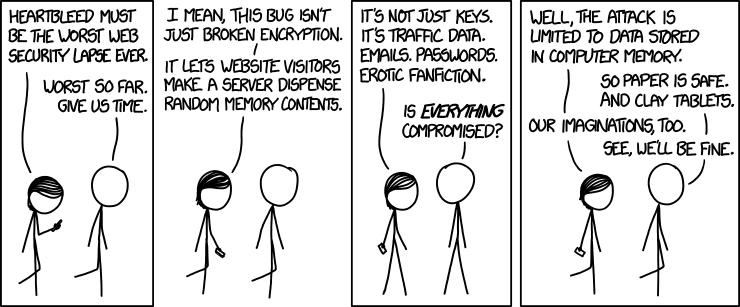
Heartbleed... have you changed your passwords yet?

If you haven't heard about it yet, there has been a flaw in the encryption protocols of Open SSL, and the so-called "Heartbleed bug" may have leaked personal information you had on these servers. So if you are using sites on the Internet that were affected (and who doesn't - Google is one of them) you might want to change your passwords.

Here's a list of affected sites; here is another one with a bit more explanation on how the bug was discovered (and links).

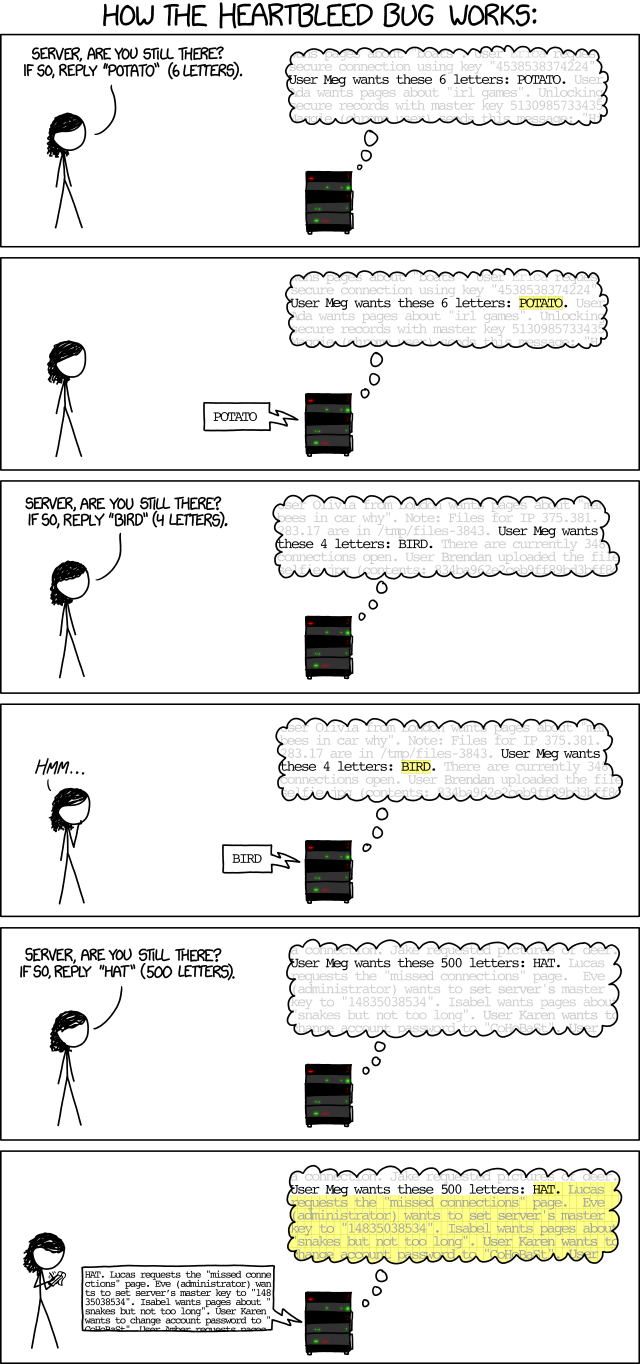
If you want the short and sweet explanation, here it is courtesy of XKCD:


On a totally different note - you can still ask me anything on yesterday's post. I'll keep checking for new questions until (and including) the Easter weekend. So go crazy!

Thursday, 6 June 2013

Productivity aids.

Back in February (wow, it's been that long now!) I blogged about a form of to-do list that gamifies life. I'm quite happy to tell you that even though the productivity spike from trying something new has ebbed, and even though there are some things I'm still doing badly at, I have stuck with the game and actually get stuff done a bit better, or so it feels. (This is always hard to tell, I think. How do you know that you are more, or less, productive than you would be with another method? Or none at all? Unless you go from, say, 5% good use of time to 95% good use of time and stick with that over several months at least, it's pretty hard to say.)

However, it was time to try something new in addition to the list. I'm suffering from the same problem many freelancers do - very little structure in a given day. Yes, there's getting up, there's the need to eat something at some point, and there's the need to sleep, and to take a break. But otherwise, my time can be arranged quite freely.

While that can be an asset - for instance, being able to take half a day off easily in case of unforeseen stuff, or re-arranging for something that came up suddenly - it can also be a hindrance. I can do that later. I can take a break now. I can read now and write later. Or whatever.

So yesterday, I decided to try the Pomodoro Technique. You may have heard of it - it's actually really simple, even though there's a whole book been written about it (a free pdf copy is linked to in the article above, or in the Wikipedia article). You take a timer (any sort will do) and set it to 25 minutes. That's time for work, and nothing else. Then you take a short break, 5 minutes, before starting on your next slice of worktime. After 4 slices (or pomodoros), you get a longer break - 15 or 20 mins, for example. Rinse and repeat.

The intention behind it is to give some structure, cut the worktime down in manageable slices that make it easier to concentrate and to tackle things that seem daunting, and provide enough breaks for recovery. It might work well, or it might not, but I'm giving it a go. After all, the worst that can happen is that I am not going to stick with it as it won't help. Should you be curious now and also want to try it, here's a link to several free timers intended especially for the technique - and there's lots more suitable on the ol' Interwebz.

Thursday, 21 March 2013

My desk is fuller again.

This time, it's not because I cluttered it with stuff (though yes, that has also happened) but because I am now working with a second screen in addition to the (not overly large) one that my laptop has. And what can I say? It's lovely. Really, really lovely - I can have several texts open at once, glance over, get my information and write something in another open window.

It feels like total, complete, utter luxury. I remember that time when 17" was a huge monitor, and when flatscreens were a sensational new thing that took up so much less space. I remember seeing a spread of more than one monitor, with the extended desktop, and being told that while that was cool it was only necessary for graphic designers or folks working a lot with AutoCAD.

I have sort of worked with two screens before, only that one of them was on my computer and the other on a second one, that having internet access, and I'd use the one for writing and the other for online dictionary searches and looking up stuff. Which meant that all kinds of weird using-the-wrong-mouse-or-keyboard moments did happen. But somehow, until recently, I did not really think about getting a second screen all for myself. Total luxury of virtual real estate.

I'll probably get used to that luxury very soon and be bewildered whenever I do not have my second screen. It's still a little weird, I'm adjusting angles, and the colours of the two screeens don't match exactly but oh, I do not mind. Finally I do not need to switch windows again, and again, and again for a simple piece of work. Hooray!

Wednesday, 13 February 2013

To-Do lists.

I don't know how all of you handle it, but I have tried out a lot of to-do lists and other track-keeping things over the years. Calendars, special "get things done" thingies, hand-written lists, reminder calendars, you name it. Some of these worked for a day, some for a week, some for two weeks... and then I would quietly ignore them and go on with my life in some other way.

The method I currently have involves a blackboard (or something quite like it) that is hanging at the wall across from my desk and that holds several things, mostly long- and mid-term projects. Add to that a stack of paper snippets with lists on them directly on my desk - most of those are short- to mediumshortterm things. (Though there are some items that keep getting transferred from one list to the next. Gah.)

But yesterday I stumbled across a new sort of to-do list... one that is supposed to give you extra motivation by not just taking that task off a list, but by sort of Roleplayifying your life. (If you have never played a roleplaying game - pen and paper or computer - and have no clue what roleplaying means, here's the short one: you play a character that goes on adventures, kills monsters, saves people, finds treasures (to buy stuff that will help during the monster-killing and people-saving and treasure-finding) and gets better and better at stuff over time.)

So the basic idea is that you have a list of stuff to do - daily, weekly, or small things you want to make a habit - and each time you sucessfully finish a task, you get XP and gold. The gold can be used to buy stuff - either rewards you made up yourself, such as "have cake", or rewards available from the shop that will help you get more gold and more XP. Which sort of makes clicking "done" on these tasks... more fun.

I'm trying this out, and I can tell you: I had a lot of fun yesterday already, even though the to-do list is freakishingly long. And even if it will not work long-term for me, I will happily take a spike in productivity.

Oh, yes, the details: The thing is called HabitRPG. It's under development, it's free (unless you die and need to resurrect yourself), and there is currently a Kickstarter campaign running (which also features a video telling you more about the idea and the "game") to help develop it more, including a mobile app, and faster.

Friday, 1 February 2013

I'm doing it again. The pdf library organisation, I mean.

As the long-term readers among you might know, I am using EndNote for my citation and bibliography needs. Theoretically, I also have all the .pdf files that I have of articles in one folder on my system, and all the titles of these articles in the EndNote database.

Theoretically. Which, unfortunately, is not at all what I really have - over time, a large stack of .pdfs has accumulated that are not yet in the database, because it all meant opening the file, copying the relevant bibliographical data into the database, then saving the file under a new (and unique) name also written to the database file. Yes, the programme can theoretically attach files to database entries - but I have never gotten the hang of that, and I also prefer to have things separately in case of desasters.

So here I was, with a stack of pdf files - unsorted, and with quite a few non-articles crept in between them - and my database. Enter Qiqqa, a database/citation tool geared entirely towards .pdf collections. (If it were a little less geared towards those, and a bit more open and more import-friendly from EndNote's end, I would have considered switching to it completely.) In my process of checking out Qiqqa, I already tried to use it for sorting, organising, and EndNote-ing my pdf files, but it turned out to be a tiny bit less trivial than I had thought.

So I have made a clean slate in Qiqqa and have now tackled (again) the task of sorting my files and inputting them into EndNote. It's still a multi-step process, but much less tedious than before. Preparation step was to make three new folders for sorting: One to hold the batch of pdfs for processing, one to hold the exported files, and one for the "rejects" - files that have obscure bibliographical data that will have to be entered by hand.

Step one: Move a batch of pdf files from the big heap into the processing folder.
Step two: Import that folder into Qiqqa (or set it as watch folder). The programme will now index (and, if necessary, OCR) those files.
Step three: Use the inbuild BibTex-Sniffer to match bibliographical data to the individual files, and delete all the non-articles from the library.
Step four: Make sure to move all the files for hand processing from the processing folder to the "rejects" folder (else they will be lost), then delete them from the library.
Step five: Export bibliographical data to a .bib file.
Step six: Export complete library to the export folder.
Step seven: Convert BibTex-file to an Endnote .xml file using this nifty little programme.
Step eight: Import bibliographical data into Endnote (excluding duplicates). (I only had one minor glitch with importing up to now which seems to have been an incompatible record type number.)
Step nine: Add "pdf file available" or similar thing into a suitable field of each of the new references (this can be done quickly with "change and move fields").
Step ten: Move all the exported files from the "doc" subfolder in the export folder into the regular folder for referenced pdf files.
Step eleven: Delete everything from the export folder and the processing folder.
Step twelve: Delete all the entries of the library.

Then start over... until everything is processed. It takes some time, but on the other hand, it allows me to be sure I get everything referenced and lets me clear out all the other pdfs that crept in without too much woes. And with the possibility to do this in smaller batches, it's also not so overwhelming to add hundreds of BibTex entries at once.

(And if this blogpost has made you want a bibliography programme/database, here is a list of those currently available, including EN and Qiqqa.)

Wednesday, 28 November 2012

I could so use a few minions.

I'm still struggling with data floods - I have solved a few small problems only to find more (of course there are more). Some of them, I guess, are the usual things - details so small that they are not listed in the normal tutorials because, duh, everyone knows that is how you do it. I know I have been guilty of the same thought in some instances, but alas, I also know the other side much, much too well.

And somehow, I can understand why there is so few statistics in archaeology or historical sciences in general, even where something like a statistical analysis would be good. The learning curve, oh, it is steep. (Or I am a little stupid - but since others agree with me, I'll go with the former assumption.)

As of now, the analysis and visualisation I've been able to do has not yielded any new and really evident things (apart from the usual - that spinners are individuals and quite, quite unpredictable).

Ah, what I would give for a few minions. One to do the boring scanning work that is now left to do. One to work out which programme best to use for the visualisation and give me an intro to it. One to finish entering books into my book database. One to make me coffee.

Okay - I can live without the last one. But the others! That would be so good!

Tuesday, 27 November 2012

Excel Woes. And Coffee Differences.

I am wrestling with Excel, and it is winning. I have not yet made it to the breakthrough in R (I think I need someone to teach me R for dummies, as I am somehow shattering on the most basic things, like importing an Excel workbook with several sheets and saving that as a dataframe) but I need some quick results. Not much, mind you; not the full analysis... but at least something. Something! And I would know how to get it! But... I have made the mistake of saving the formulas in one workbook, and now I need them in another one. And due to the perverseness of my system, and that of Excel, and that of the worksheets... I get an out-of-memory error every time. No, the workarounds all do not work. Yes, I have tried them all (at least all that I could find). Arrr...


And since two people posed the same question yesterday: From what I remember of Swedish coffee (real Swedish coffee drunk in Sweden, from a cafe or a selling point for caffeinated hot drinks) they are large, they are strong (but not overly so) and they are delicious to my taste - with neither too much acidity nor too much bitterness. Not like the thing we termed "Swedish coffee" at the Forum - though of course there are different strength and quality coffee experiences to be found in any country.
German plain coffee roasts often have a tendency to be quite acidic, and the sourness is something I neither like nor can stomach well, so I am fond of the "milder" kinds of beans here, and I generally prefer the fancy coffees with lots of milk (latte macchiato, anyone?). And the coffee I tasted in the Czech Republic was not really acidic, but always quite, quite strong, plus the beans and/or roast and extraction must have been different, since it was very bitter (at least to my taste).
Your coffee-when-traveling observations are very welcome in the comments - I'd be interested to hear what experiences you have had!

Thursday, 22 November 2012

Data mining, next go.

Here it is again, my neverending spinning experiment. After my successfull using of ImageJ for the processing of visual survey cards from the experiment, I now have this huge stack of data that is still mostly un-mined. And I am convinced that there is more to be had from it, much more.

So I'm having another look at the data, and consequently at several programmes that might help me in tickling more insight out of the stack of numbers that I have. During my browsing of the net, however, I found this introduction into statistics and data mining - which is a very nice, easy to understand intro explaining all the things that data mining GUIs offer.

It's on my reading list now - while I go hunting some more for the perfect programme for my needs. There are still a few on the list that look promising...

Wednesday, 21 November 2012

Databases (again), part II.

Endnote is, according to their makers, the bestest citation software ever. As is Zotero (according to their makers). And probably a bunch of others as well.

Back when I was still trying out stuff and relatively new to the world of people working in physics (who have an affinity to LaTeX-the-programme), I wrote one article in TeX. I had to re-do it in MS Word to get it published, but this little stint meant that I got to know the powers of BibTeX, which is the citation system thingie that comes with TeX. It is, more or less, a reference database that you cite from, and the programme does the formatting.

Sound familiar? That's just what EndNote does with Word. Back when I then found out that there was, indeed, such a programme, I bought it for the hefty sum they asked for the student edition back then and have been using it ever since. There's connection files to get data from online library catalogues (something I should have used more, I now think, it might have saved me lots of work), style files that can be altered to suit individual needs, and both a field for "notes" (which I use for making general, personal notes about a reference) and "research notes" (which I use for typing excerpts or snippets including the page number so they can actually be used for working without the physical copy of the book). Plus there are custom fields - those I have used to mark whether I own a book (physical or digital copy), where it stands in my library (well, that's a work in progress to be honest), if I have pictures in my picture database (by noting down the prefix of the image files, such as schweppe_ which is, in the actual files, followed by a page number so I have files like schweppe_10.png) and if I have already read it or just jotted it down for future reading.

According to the version history, my purchase of the programme must have been in 2004. Which means that my version is a little... older. Now, I have no problem with older software (I'm happily using Word2000, and not planning to change from that), but sometimes, it pays to look for alternatives. Especially since my EndNote is sort of iffy on the connection files, with quite a few of them not working (or not working anymore), and I cannot download the whole set of new ones from the site (there is no such button in my installation menu).

Due to the recent mention of Mendeley by Phiala in the comments of some other post, I did a little looking and found Qiqqa - a .pdf organising software with built-in OCR, a wizard to help with filling out the reference data for each imported .pdf, and the possibility to cite to Word. I quite like it on the first try and am currently using it to get some order into my .pdfs. I have even considered changing to this programme from EndNote for all my referencing, but it does not do a few things that I have grown accustomed to, and I have also read that it's not too easy to modify citation styles (something I regularly need to do).

Qiqqa is intended for use over the web, with web storage of .pdfs, something which I don't need (and don't want). It allows "vanilla references", that is those without a .pdf attached, but then I get a nasty popup if I want to associate a file with it now. It also does import from EndNote - but not the "Research Notes". There is the possibility to search for duplicates, but I found it rather hard to compare the actual duplicates with each other and decide which one should stay and which one should go. I have not tried the citation thingie yet, but from the overall feel, it's very much geared towards .pdf files only, and I don't want to use two programmes. So at the moment, my plan is to use Qiqqa to get some order into my .pdf files, then export the data via BibTeX and a converter to EndNote, and merge the two databases. (That's the plan only, though - and it might change if problems with the import should arise. Or if Qiqqa should evolve some more, and then I might reconsider using it as my new reference database thingie.)

I'd be happy to hear about your experiences with Qiqqa, EndNote, Zotero or whatever you use!

Tuesday, 20 November 2012

Databases (again).

As the long-term readers among you might know, I am using Endnote for my references and bibliography, and a programme called Fototime FotoAlbum. Both have been on my system for years now, so I have gained a bit of experience with them.

FotoAlbum is making a good job of sorting and handling my image database, and their online support is one of the best I know. There was no instance where I didn't get a speedy reply, and things were taken care of whenever possible (I realise that not all my requests would fall in line with the needs of the normal customers, so it's understandable they are not adapting the programme just for me).
The programme allows notes and comments, ratings, copyright notes, keywords and captions; it has filters and an "album" system that makes it possible to store pictures in a given folder structure, yet have them as part of several albums. There's also the possibility to define smart albums, automatically putting pictures in there if they have the right keywords, date, or other defined thing.

Speaking of dates - I use the programme to sort my picture database which, logically if you are working about medieval stuff, consists mostly of old things. The photo timeline is quite generous, since it allows to go back until 1700 (there were no photos before that time, right? Right? Yes.). For stuff from the 9th or 12th century... that's a bit late, though. So I developed my own system that has been successful for years now: I use the 1700 as code for my centuries, as in 1708 - eighth century, 1715 - fifteenth century. And I even have a months key, for example January 1713 means from 1200 to the 1220s. The months key is not perfect (due to my less than perfect definition, that is) but it works fine and it allows me to sort all my pictures by date. And I have a lot of pictures.

So if you are in search of a picture database, I can fully recommend the programme. I use the paid-for edition, due to a few reasons of my own, but FotoAlbum is also available in a free edition that will already serve for most database-related needs, including handing out your pictures or a selection of them, with all the data attached and viewable, to someone else.


As for Endnote... that's something to write about tomorrow.